transpose_weights_conservative#
- regridding.transpose_weights_conservative(weights, coordinates_input, coordinates_output, axis_input=None, axis_output=None, weights_input=None)[source]#
Transpose matrix of weights and normalize to be conservative.
Similar to
transpose_weights(), this function transposes the matrix of weights calculated byregridding.weights(). However, this function also applies the appropriate normalization to the transposed weights such that they conserve flux when used withregridding.regrid_from_weights()to perform an inverse transform.- Parameters:
weights (tuple[ndarray, tuple[int, ...], tuple[int, ...]]) – Ragged array of weights computed by
regridding.weights().coordinates_input (ndarray | tuple[ndarray, ...]) – Vertices of each cell in the input grid provided to
weights(). Each transposed weight will be multiplied by the volume of the corresponding cell in the input grid.coordinates_output (ndarray | tuple[ndarray, ...]) – Vertices of each cell in the output grid. Each transposed weight will be divided by the volume of the corresponding cell in the output grid.
axis_input (None | int | tuple[int, ...]) – Logical axes of the input grid to resample. If
None, resample all the axes of the input grid. The number of axes should be equal to the number of coordinates in the input grid.axis_output (None | int | tuple[int, ...]) – Logical axes of the output grid corresponding to the resampled axes of the input grid. If
None, all the axes of the output grid correspond to resampled axes in the input grid. The number of axes should be equal to the number of coordinates in the output grid.weights_input (None | ndarray) – An optional array of weights that were applied to the input values by
regridding.weights(). Each transposed weight will be divided by its corresponding input weight.
- Return type:
Examples
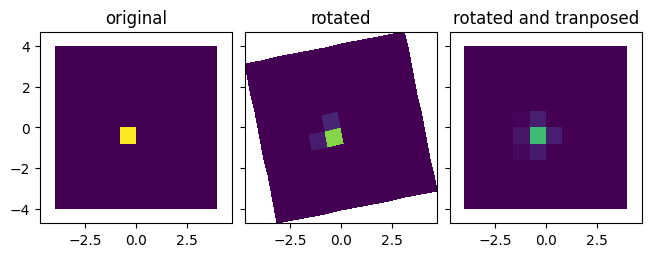
Regrid array of values onto new grid with precalculated weights, and then transform back with transposed weights.
import numpy as np
import matplotlib.pyplot as plt
import regridding

# Define input grid
x_input = np.linspace(-4, 4, num=11)
y_input = np.linspace(-4, 4, num=11)
x_input, y_input = np.meshgrid(x_input, y_input, indexing="ij")

# Define rotated output grid
angle = 0.2
x_output = x_input * np.cos(angle) - y_input * np.sin(angle)
y_output = x_input * np.sin(angle) + y_input * np.cos(angle)

# Define arrays of values defined on the same grid
values_input = np.zeros((10, 10))
values_input[4, 4] = 1

# Save regridding weights relating the input and output grids
weights = regridding.weights(
    coordinates_input=(x_input, y_input),
    coordinates_output=(x_output, y_output),
    method="conservative",
)

# Regrid the first array of values using the saved weights
values_output = regridding.regrid_from_weights(
    *weights,
    values_input=values_input,
)

# Transpose calculated weights
weights_transposed = regridding.transpose_weights_conservative(
    weights,
    coordinates_input=(x_input, y_input),
    coordinates_output=(x_output, y_output),
)

# Regrid the regridded values back onto original grid using transposed weights.
values_transposed = regridding.regrid_from_weights(
    *weights_transposed,
    values_input=values_output,
)

# Plot the original and regridded arrays of values
fig, axs = plt.subplots(
    nrows=1,
    ncols=3,
    sharex=True,
    sharey=True,
    constrained_layout=True,
)
axs[0].pcolormesh(x_input, y_input, values_input, vmin=0, vmax=1);
axs[0].set_title(r"original");
axs[1].pcolormesh(x_output, y_output, values_output, vmin=0, vmax=1);
axs[1].set_title(r"rotated");
axs[2].pcolormesh(x_input, y_input, values_transposed, vmin=0, vmax=1);
axs[2].set_title(r"rotated and tranposed");
axs[0].set_aspect("equal");
axs[1].set_aspect("equal");
axs[2].set_aspect("equal");